
Teams and groups · 5 min read
Give a Manager access to a team
Choose the Manager role and explicitly limit the user to the teams they administer.
Admin and Manager access
- Admins control the whole account, including people identities, teams, groups, users, settings, and billing.
- Managers work only with explicitly assigned teams and the groups and people reachable through those teams.
Assign a Manager to teams
- Open Settings and Users
Select an existing user or choose Add user to invite someone new.
- Choose Manager
Set Role to Manager. A Manager must have at least one team assignment.
- Select the teams
Check every team this person should manage and leave unrelated teams unchecked.
- Save changes
Accepted invitations and active users receive the selected team scope the next time authorization is evaluated.
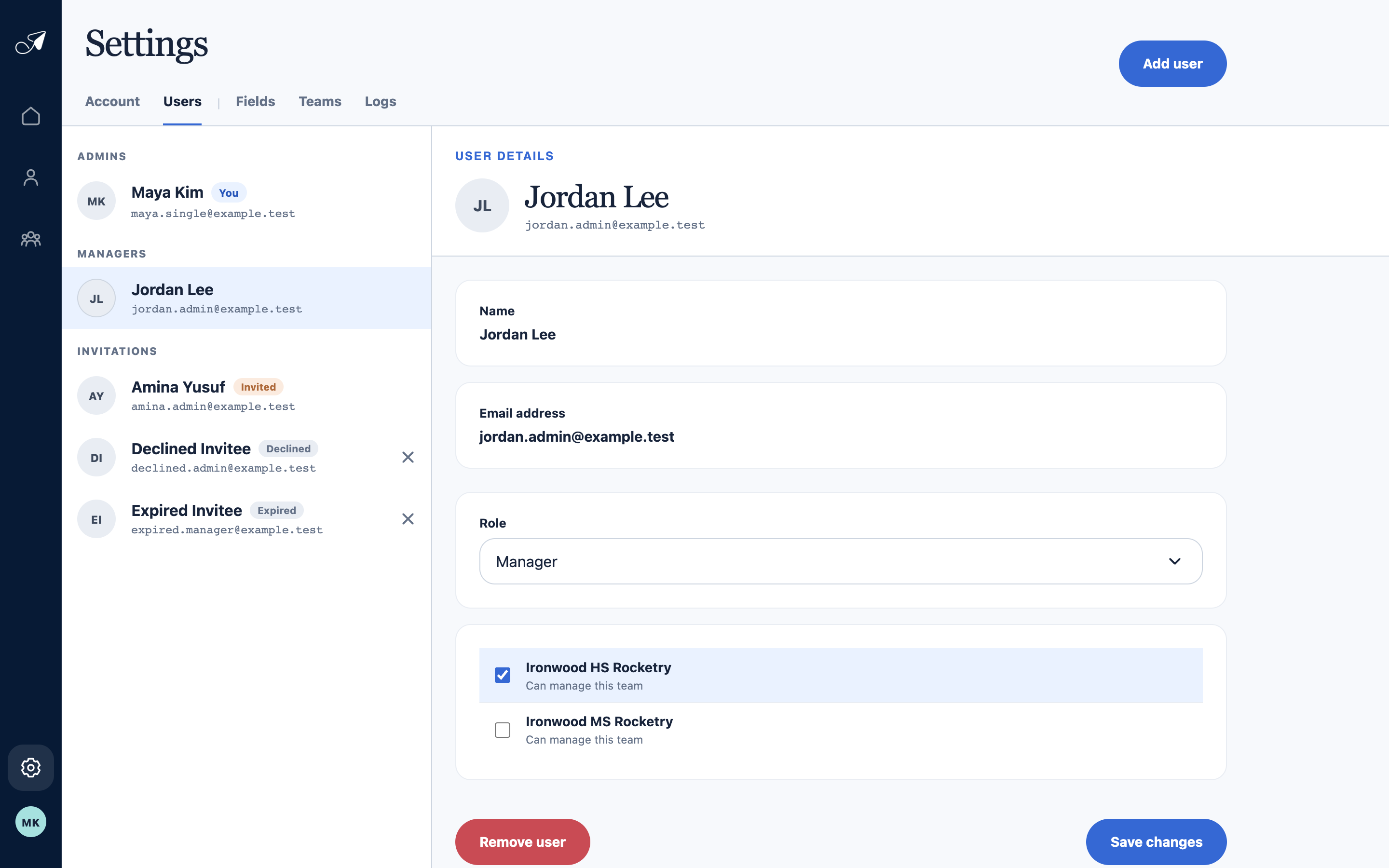
Manager access is explicit: select only the teams this user should be able to manage.
- 1Active Managers and invitations
- 2Selected user
- 3Manager role
- 4Explicit team assignments
Change or remove access
An Admin can return to the user’s Access section to add or remove team assignments, change the role, or remove the user. TellTell always requires at least one Admin on an active or suspended account.