
People and memberships · 5 min read
Use the People membership grid
Compare people against group columns and save several roster changes together.
Open the grid
Open People and choose Memberships. Select a team to place people in rows and up to 10 of that team’s groups in columns. A filled check means the person currently belongs to the group.
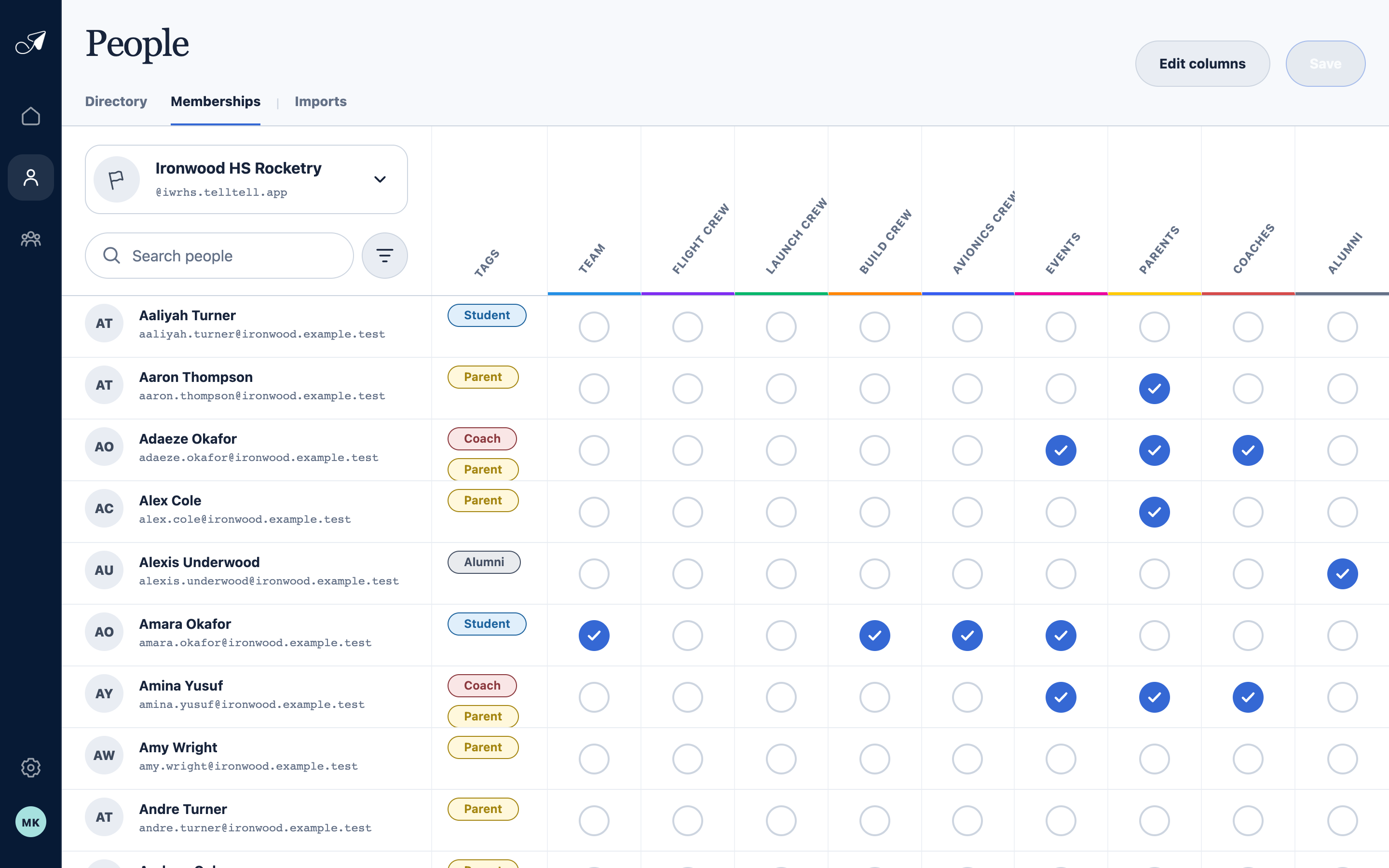
The grid is a fast roster view for comparing and changing several memberships inside one team.
- 1Choose one team
- 2Search and filter people
- 3Groups shown as columns
- 4Current group membership
Make and save changes
- Click a membership cell
An empty circle becomes a pending addition. An existing check becomes a pending removal. Click again to undo that pending change.
- Review pending changes
Scan the affected rows and columns. Choose Cancel to discard every pending change in the grid.
- Choose Save
TellTell applies the additions and removals together. New eligible addresses receive the relevant group welcome messages.
Choose useful columns and filters
Choose Edit columns to arrange person fields and select up to 10 groups for the current team. Use Search people or the filter button to narrow the rows without changing memberships outside the visible result set.