
Start here · 5 min read
Set up your account and first team
Choose the account name, first team, managed email subdomain, and trial timing.
Before you start
Your first Google, Microsoft, or Facebook sign-in creates one TellTell account. During setup, choose an account name and the managed TellTell subdomain for your first team.
Set up the account
- Choose a sign-in provider
Use the Google, Microsoft, or Facebook account that should become the first TellTell Admin. Keep using that same provider for this TellTell login.
- Name the account
Use the organization name that organizers will recognize, such as Ironwood Rocketry.
- Choose the first team’s TellTell subdomain
Choose a short, memorable value. If you enter
iwrhs, group addresses will end in@iwrhs.telltell.app. - Confirm your time zone
TellTell uses it to show message and activity dates in the context your organizers expect.
- Start the trial or skip for now
Skip if you want to finish the directory first. Start the trial when you are ready to send.
Review the team in Settings
Open Settings, choose Teams, and select the team. This is where an Admin can rename it or review the managed TellTell domain used by every group in that team.
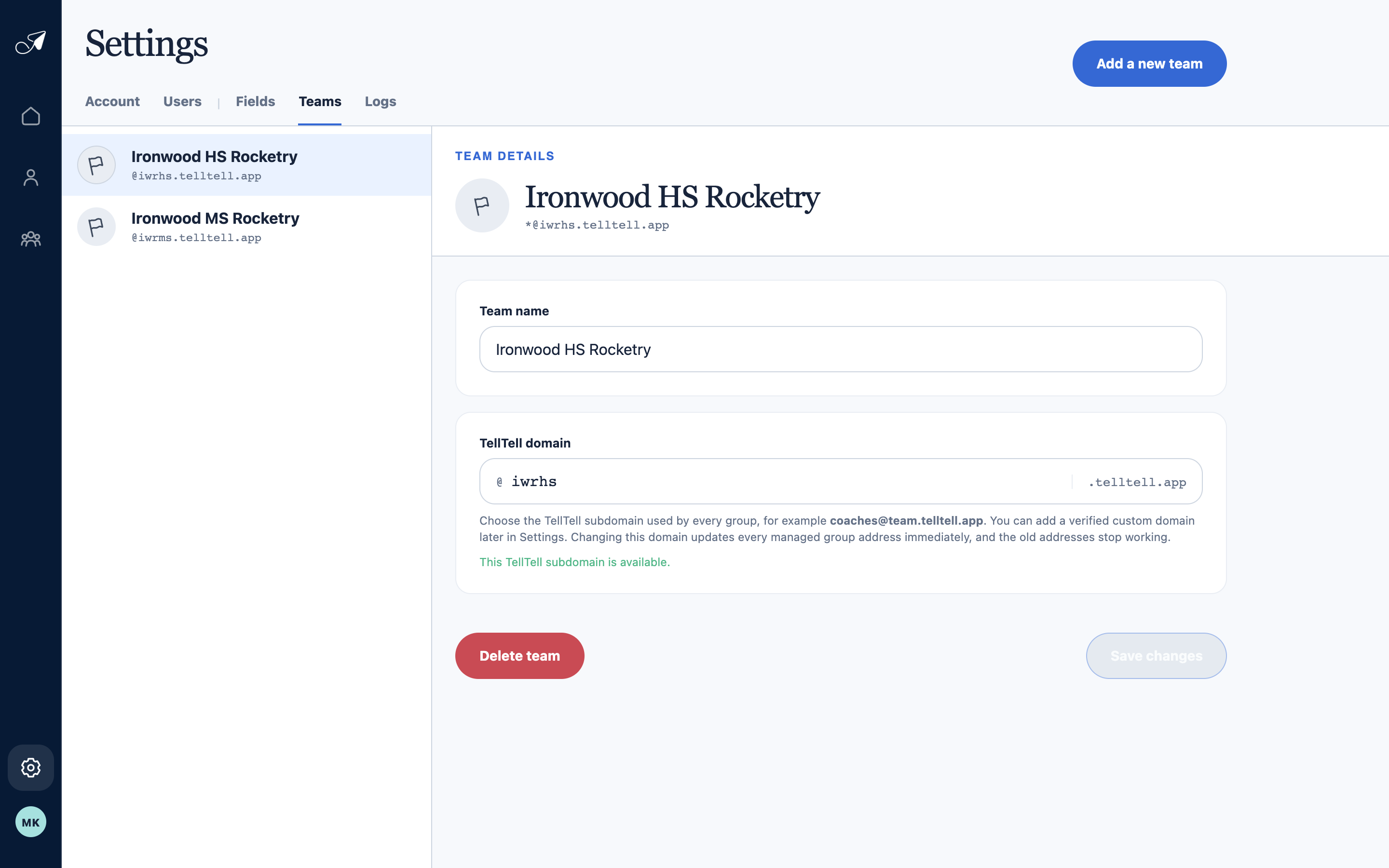
The selected team owns one managed TellTell domain shared by all of its group addresses.
- 1Teams in this account
- 2Editable team name
- 3Managed TellTell subdomain
- 4Add another team