
Sending and delivery · 4 min read
Send a message from your regular email client
Address an ordinary email to a TellTell group and follow its delivery from the Messages tab.
Send from the inbox you already use
- Copy the group address
In TellTell, open Groups, select the group, and copy the address shown below its name.
- Compose a normal email
In Gmail, Outlook, Apple Mail, or another mail client, put the group address in To. Add your subject, message, and attachments as usual.
- Check the From address
Choose an address that the group allows to send. An alias is a different address, even when it reaches the same inbox.
- Send and review the result
TellTell authenticates the incoming message, resolves eligible recipient addresses, and records the result on the group's Messages tab.
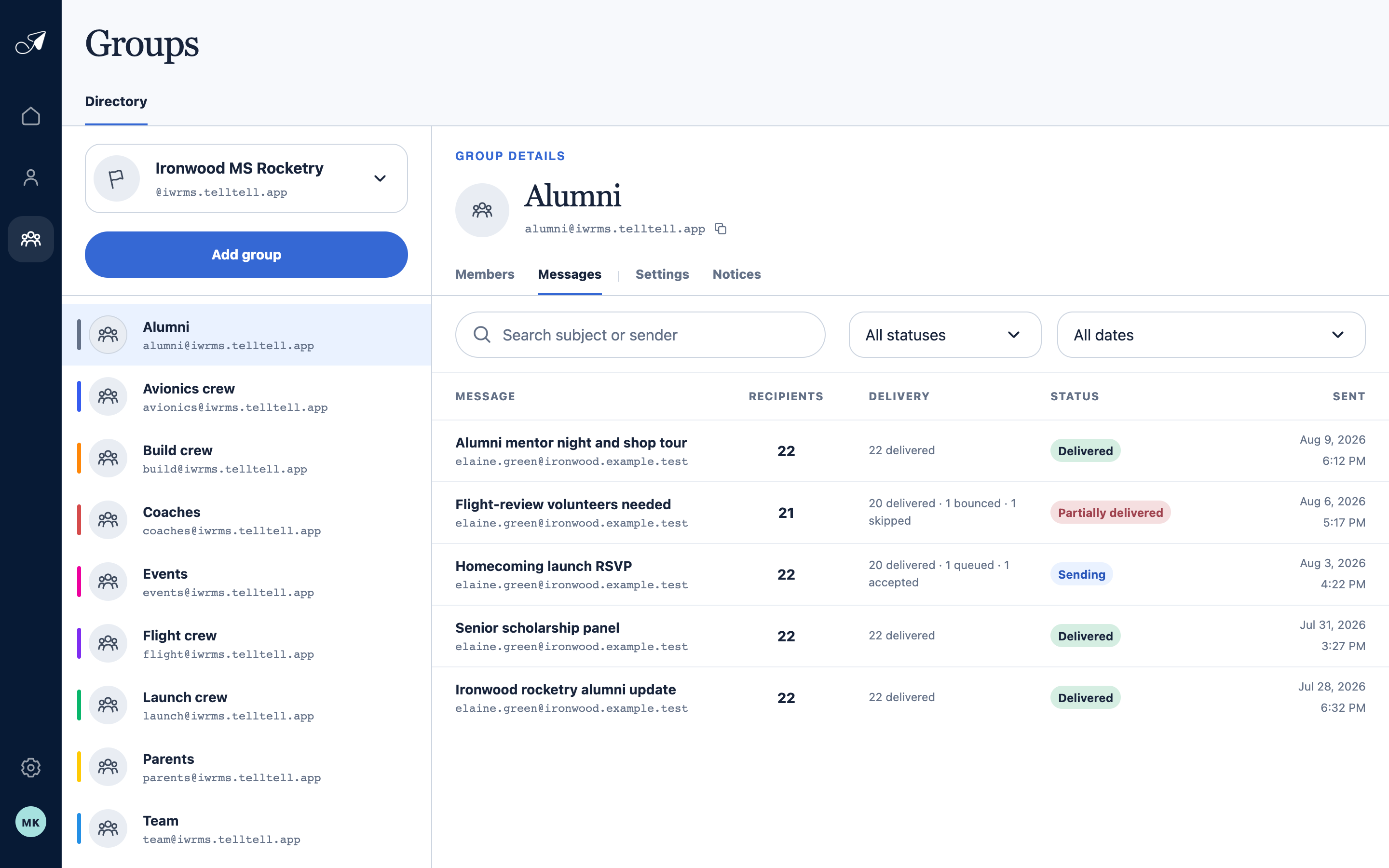
Messages keeps a durable operational record of what TellTell accepted and what happened next.
- 1Group addresses
- 2Selected group address
- 3Messages tab
- 4Recipient count and status
What happens after you press Send
- TellTell checks the group, the authenticated From address, message size, and current sending limits before fan-out.
- Each eligible member address is selected once. Unsubscribed, removed, disabled, complained, or known-undeliverable addresses are skipped with a reason.
- TellTell sends separate deliveries and updates the group message as provider events arrive.